One combined frame is required
The video step takes one prepared image containing both performers. It does not automatically turn two uploads into two jobs.
Model
Optional details: alternating lead and hype gestures; fixed frontal medium framing; warm orange studio; short original rap and beat
216/1566
≈ 290 credits
The exact cost is confirmed after you sign in.
Sign in to see your credit balance and generate a video.
The estimate is for the model, length and settings you have selected.
Sign in to see the exact credit cost before generating.
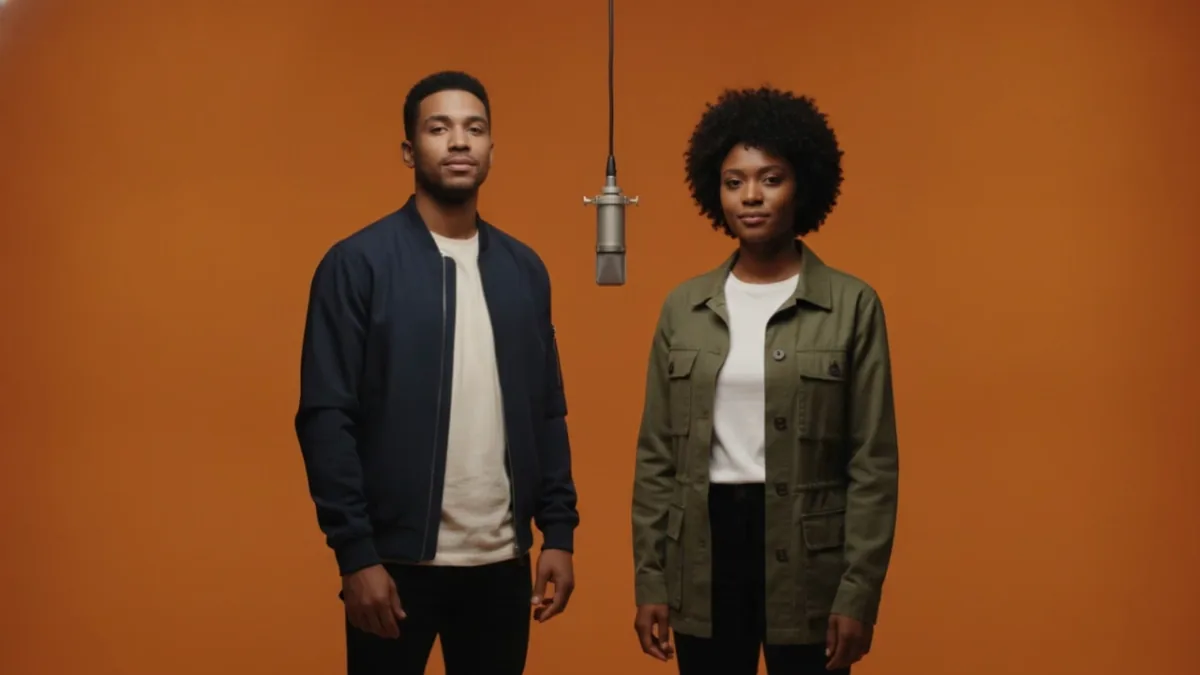
VidKiss generated example
Generated from a fictional duo frame with Kling 3.0; motion and audio vary. Start playback and turn on sound.
Create an original short duo performance from one combined image. Choose Kling 3.0 or Veo 3.1 image-to-video to keep two fully clothed adults standing left and right in a warm orange studio, with one central silver hanging microphone and a fixed frontal one-shot. Audio follows the selected model and settings.
What this creates: Use one combined image as the source for Kling 3.0 or Veo 3.1 image-to-video. Kling 3.0 starts at 5 seconds, Standard, 16:9, with audio on; Veo 3.1 starts at 8 seconds, 720p, 16:9, with audio generated automatically. Veo 3.1 audio output can vary. The fixed frontal one-shot keeps two fully clothed adults on the left and right around one central silver hanging microphone, alternating lead and hype gestures over an original short rap and beat. Audio and exact vocals are not guaranteed. Do not add guitars, keyboards, other instruments, a crowd, logos, or brand marks; the result does not copy an artist, song, lyrics, music, or voice.
Use the helper to combine exactly two permitted adult portraits into one fully clothed frame with one person on the left and one on the right. Frame preparation and video generation are separate steps, each with its own exact credit quote before generation.
Start with one combined image, describe an original performance, and review the exact video cost before you generate.
Use one image containing two permitted adult performers standing left and right. If you only have separate portraits, prepare the frame first; the preparation job is a separate, separately charged step.
Choose Classic duo, Call and response, or Energetic duo. Each preset keeps your chosen model: Kling 3.0 starts at 5 seconds, Standard, 16:9, and audio on; Veo 3.1 starts at 8 seconds, 720p, 16:9, with audio generated automatically. Veo 3.1 audio output can vary. You can edit the prompt and settings afterward. Do not ask the workflow to copy an artist, song, lyrics, music, or voice.
Keep the combined image in its upload slot, review the exact credit cost beside Generate, and submit only when ready. Choosing a preset never submits automatically; the selected-model video job is charged separately from any frame-preparation job.
The template turns one combined image into a short, stylized performance clip. The people, words, timing, and visual details can vary from one generation to the next.
Kling 3.0 is the default image-to-video model and starts at 5 seconds, Standard, 16:9, with audio on. Veo 3.1 starts at 8 seconds, 720p, 16:9, with audio generated automatically, and its audio output can vary. The result follows your combined image and performance details.
Kling 3.0 can generate audio with the clip, while Veo 3.1 generates audio automatically and its audio output can vary. You do not upload a song or an original recording here, and the result does not promise audio, exact vocals, voice cloning, or precise lip sync.
The warm orange studio, one central silver hanging microphone, fixed frontal one-shot, and alternating lead-and-hype gestures give the clip its visual direction. The tool creates an original result and does not imitate or represent a specific artist or group; do not add instruments.
The video step takes one prepared image containing both performers. It does not automatically turn two uploads into two jobs.
Faces, clothing, gestures, words, rhythm, lip movement, and the central microphone can vary. Review the finished clip before publishing.
It creates a short original duo performance from one combined image, with two fully clothed adults left and right, a warm orange studio, one central silver hanging microphone, and a fixed frontal one-shot. Choose Kling 3.0 or Veo 3.1 image-to-video; audio follows the selected model and settings.
No. Migos AI is one search term people use for this visual trend. The result is original and this tool is not affiliated with, endorsed by, or a replacement for any artist, group, song, or recording.
The video step needs one combined duo image. Use Prepare a Rap Duo Frame to combine exactly two permitted adult portraits into a fully clothed left-and-right frame, then start the video step.
No. Preparing the frame and generating the video are separate steps. Each step shows its own exact credit cost before generation, and neither step automatically starts the other.
Classic duo, Call and response, and Energetic duo fill in an editable original performance direction while preserving your chosen model. Kling 3.0 starts at 5 seconds, Standard, 16:9, with audio on; Veo 3.1 starts at 8 seconds, 720p, 16:9, with audio generated automatically, and its audio output can vary. Choosing one changes the form only and does not submit or clear your combined image.
The orange studio, central microphone, and duo staging are visual inspiration. VidKiss generates an original rap and beat; it does not reproduce the source song, exact movement, artist voice, or guaranteed lip-sync timing.
No. This workflow does not accept uploaded music or an original recording, and it does not offer voice cloning or promise exact words, vocals, rhythm, audio, or lip-sync timing. Kling 3.0 can generate audio when enabled; Veo 3.1 generates audio automatically and its audio output can vary.
The current exact credit cost for the selected settings appears beside Generate before you submit. The frame-preparation step, if used, has its own separate cost.